

Wazir-e-Azam Apna Ghar Program
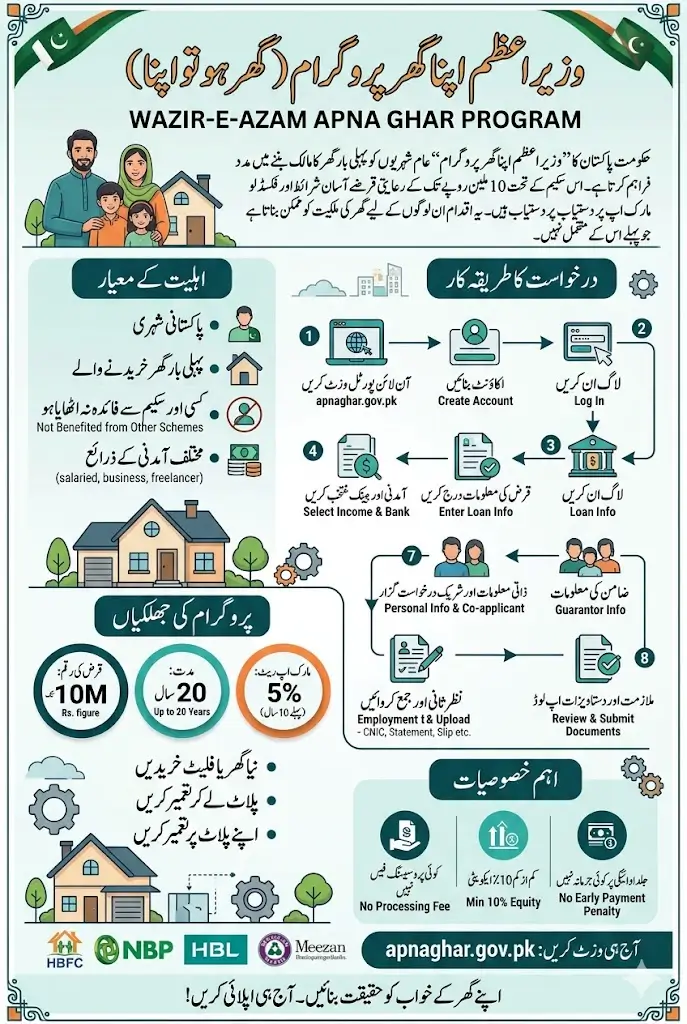
The Wazir-e-Azam Apna Ghar Program, officially known as “Ghar Ho Tu Apna,” is one of the most important housing finance initiatives launched by the government of Pakistan to help ordinary citizens own their first home. The program offers subsidized loans of up to Rs. 10 million with a fixed low markup rate, making homeownership possible for people who previously could not afford it.
Whether you are a salaried employee, a business owner, a freelancer, or someone with an informal income source, this scheme is open to you as long as you meet the basic eligibility conditions.
This guide walks you through everything you need to know about the Wazir-e-Azam Apna Ghar Program in 2026, including who can apply, how much financing is available, what the repayment terms look like, and a detailed step-by-step process to submit your application successfully through the official online portal.
Wazir-e-Azam Apna Ghar Program 2026 Overview
| Program Detail | Information |
|---|---|
| Program Name | Wazir-e-Azam Apna Ghar Program |
| Maximum Loan | Rs. 10 million |
| Loan Tenure | Up to 20 years |
| Markup Rate | 5% for the first 10 years |
| Minimum Equity | 10% |
| Eligibility | First-time Pakistani homeowners with a valid CNIC |
| Eligible Income Groups | Salaried, business, freelance and informal-income applicants |
| Loan Purpose | Purchase or construction of a house/flat |
| Processing Fee | No fee |
| Application Method | Online through apnaghar.gov.pk |
You Can Also Read: FIA Extends Job Application Deadline
What Is the Wazir-e-Azam Apna Ghar Program?
The Wazir-e-Azam Apna Ghar Program is a government-backed affordable housing finance scheme designed to give eligible Pakistani citizens access to low-cost home loans.
The program operates through an online portal at apnaghar.gov.pk and connects applicants directly with participating banks, including commercial banks, Islamic banks, microfinance banks, and the House Building Finance Corporation.
The scheme allows applicants to use the financing for purchasing a ready-built house or flat, buying a plot and constructing a house on it, or building a house on a plot they already own. This flexibility makes it suitable for people in different financial and property situations across Pakistan.
Who Is Eligible to Apply?
Before starting your application, it is important to confirm that you meet the eligibility requirements set by the program. The scheme is specifically designed for first-time homeowners, and there are clear conditions every applicant must satisfy.
To be eligible for the Wazir-e-Azam Apna Ghar Program, you must meet the following conditions:
- You must be a Pakistani citizen holding a valid Computerized National Identity Card.
- You must be a first-time homeowner, meaning you should not already own any housing unit registered in your name anywhere in Pakistan.
- You must not have previously taken a loan or received any benefit under any other government housing scheme.
- You must belong to one of the accepted income categories, which include salaried persons, business owners, freelancers, and people earning from informal sources.
If you meet all of the above conditions, you are eligible to proceed with the application process through the official portal.
You Can Also Read: 8171 CNIC Check Online 13500 May Payment
Financing Amount, Tenure, and Markup Rate
The program offers housing finance in four specific slabs. Applicants can choose the amount that suits their needs and repayment capacity. The available financing slabs under the program are as follows:
| Loan Amount | Details |
|---|---|
| Rs. 2.5 million | Available under Apna Ghar Program 2026 |
| Rs. 5 million | Available under Apna Ghar Program 2026 |
| Rs. 7.5 million | Available under Apna Ghar Program 2026 |
| Rs. 10 million | Available under Apna Ghar Program 2026 |
The Apna Ghar scheme offers a maximum loan tenure of 20 years, allowing applicants to repay in easy, long-term installments. The markup rate is 5% per year for the first 10 years, after which it shifts to the prevailing market banking rate for the remaining period.
Step-by-Step Application Process
The entire application process is online through the official portal at apnaghar.gov.pk. Before starting, keep your CNIC, bank details, income proof, and documents ready. Below every step is clearly explained:
Step 1: Visit the Official Website
Start your application by opening the official government portal on any internet browser.
- Open your browser and go to apnaghar.gov.pk
- Make sure you are on the correct official government website
- You will see two options on the homepage which are Create Account and Login
Once you land on the homepage, you are ready to move to the next step.
Step 2: Create Your Account
You need to create a free account on the portal before you can fill in any application details.
- Click on the Create Account button
- Enter your full name, CNIC number, mobile number, email address, and create a password
- Double check all details before clicking the Register button
- Your account will be created successfully after registration
After completing registration, your account is active and ready to use for login.
Step 3: Log In to the Portal
Once your account is created, log in to the portal and begin the actual application process.
- Go back to the login page and enter your CNIC number and password
- Enter the security code displayed on the screen
- Click Sign In to access your account
- Read all the instructions shown on the portal carefully
- After reading, click the Apply Now button to begin your application
After clicking Apply Now, the portal will guide you through the remaining steps one by one.
Step 4: Select Your Income Category
The portal will first ask you to identify what type of income you earn before proceeding further.
- Select Salaried Person if you receive a monthly salary from an employer
- Select Business Income if you run your own business
- Select Informal or Other Income if you are a freelancer or have no fixed salary
- Choose the correct category because your required documents depend on this selection
Selecting the wrong category can affect the form fields and documents required, so choose carefully.
Step 5: Enter Your Bank Details
In this step you will tell the portal which bank you want to receive your loan from.
- Select your preferred bank from the list of participating banks shown on the portal
- Enter the branch name and city of your selected bank branch
- Enter your bank account number carefully
- If the portal asks for a simple account number, do not enter IBAN format
- Salaried applicants should preferably select the bank where their salary is received
- Click Save and Next after completing this section
Providing correct bank details is important as this is where your loan will be processed and disbursed.
Step 6: Select the Purpose of Financing
Now you will tell the portal exactly what you plan to do with the financing amount you are requesting.
- Select Purchase of House or Flat if you want to buy a ready property
- Select Purchase of Plot and Construction if you want to buy land and build on it
- Select Construction on Already Owned Plot if you own land and need funds to build
- Enter the financing amount you want, choosing from Rs. 2.5 million, Rs. 5 million, Rs. 7.5 million, or Rs. 10 million
After selecting the purpose and amount, the portal will move you to the next section automatically.
Step 7: Enter Equity Contribution and Loan Tenure
This section requires you to enter how much you will contribute yourself and how long you want to repay the loan.
- Enter your equity contribution percentage in the field provided
- The minimum equity required is 10 percent of the total financing amount
- You can enter a higher percentage if you want to reduce your loan amount
- Enter the city where the property is located
- Select your preferred loan tenure of up to 20 years maximum
- Click Save and Next to proceed
Choosing a longer tenure will reduce your monthly installment but increase the total amount paid over time.
Step 8: Fill In Your Personal Information
This is one of the most detailed sections where you will enter all your personal and residential information.
- Enter your CNIC issue date, date of birth, mobile number, and gender
- Enter your father’s full name and father’s CNIC number
- Enter your marital status, number of dependents, and mother’s name
- Select your current residential status such as own house, rented, hostel, or living with family
- If you live on rent, enter your monthly rent amount
- Select your province and district from the dropdown menus
- Enter your residential address and mailing address, both can be the same
- Click Save and Next after completing all fields
Make sure every detail you enter here matches exactly what is on your official CNIC and documents.
Step 9: Add Co-Applicant Details
If you are applying with another family member, this section allows you to add their information to strengthen your application.
- If applying with another person such as your spouse or sibling, select Yes for co-applicant
- Enter the co-applicant’s full name, relationship to you, CNIC number, mobile number, email, and monthly income
- If you are applying alone, simply select No and move forward
Adding a co-applicant with a stable income can improve your chances of loan approval significantly.
Step 10: Enter Guarantor Information
Every application requires a guarantor who will support your loan request with their personal details.
- Enter the guarantor’s full name, CNIC number, and income details
- The guarantor can be a family member, relative, or trusted friend
- Upload a recent clear passport-size photograph of yourself
- Click Save and Next after completing this section
Make sure your guarantor is aware that their details are being submitted and that they are willing to support your application.
Step 11: Enter Employment Details
This section collects information about where you work and how much you earn every month.
- Enter your employer’s name, job type, and employer’s full address
- Enter your office address, designation, and the date you joined your current job
- Enter your net monthly income which is the amount received after tax deductions
- Enter your office contact number accurately as the bank may call to verify employment
- If you have a previous employer and the field is required, fill it in, otherwise leave optional fields blank
- Click Save and Next after completing this section
Always enter your net income and not your gross income as the bank will verify this against your salary slip.
Step 12: Upload Required Documents
This is the final data entry step where you will upload all supporting documents for your application.
- Upload a clear scanned copy or photo of your CNIC front and back
- Upload your recent passport-size photograph
- Upload your employment certificate issued by your current employer
- Upload your latest salary slip
- Upload your six-month bank statement obtained from your bank
- Upload your account maintenance certificate, which is a separate document from the bank statement
- Upload the CNIC of your next of kin
- Upload co-applicant documents if you have added a co-applicant
- Make sure every document is clearly visible and readable before uploading
Poor quality or blurry documents are one of the most common reasons for application delays, so take extra care here.
Step 13: Review and Submit Your Application
This is the final step where you will check everything one last time before sending your application.
- After uploading all documents, carefully review every section of your application
- Check that all entered details match your official documents exactly
- If you find any mistake, go back and correct it before submitting
- Tick the confirmation checkbox at the bottom of the page
- Click Submit Application to finalize and send your application
- Save your application reference number for future tracking and follow-up
After submission, regularly check the portal for updates on your application status and wait for further instructions from your selected bank.
After completing all the above steps, carefully review the entire application, tick the confirmation checkbox, and click Submit Application to finalize your submission.
Documents Required for the Application
Having your documents ready before you start the application will save you time and prevent errors. All uploaded documents should be clear, complete, and readable. The documents you will need to upload are as follows:
- CNIC front and back copy
- Recent passport-size photograph
- Employment certificate from your employer
- Latest salary slip
- Six-month bank statement
- Account maintenance certificate from your bank
- Next of kin CNIC copy
- Co-applicant documents, if you are applying with another person
Note that the six-month bank statement and the account maintenance certificate are two separate documents. Both must be obtained from your bank individually. Do not try to use one in place of the other.
Processing Fee and Early Payment Penalty
One very important thing to note about this scheme is that there are no processing fees attached to it. The government has made it completely free to apply and process the application.
There is also no early payment penalty, which means if you are in a position to repay your loan before the tenure ends, you can do so without any additional charges.
If anyone asks you to pay money in advance or as a processing fee before your loan is approved, do not pay. The scheme does not authorize any such charges, and such requests should be treated as fraudulent.
You Can Also Read: Flour Prices Surge Across Pakistan as 20kg Bag Becomes Costlier
Banks Participating in the Scheme
The program includes a wide range of banking institutions so that applicants from all parts of Pakistan can access the financing conveniently. Participating institutions include commercial banks, Islamic banks, microfinance banks, and the House Building Finance Corporation (HBFC).
During the application process, you will be able to select the bank of your choice from the available list on the portal.
Salaried applicants are advised to select the bank where they currently receive their monthly salary, as this can make the verification and approval process smoother and faster.
Final Words
The Wazir-e-Azam Apna Ghar Program 2026 is a genuine and accessible opportunity for Pakistani citizens to move toward owning their first home with government support.
The subsidized markup rate, flexible income categories, and straightforward online process make it one of the most practical housing schemes the government has introduced in recent years. If you are eligible, there is no reason to delay.
Visit apnaghar.gov.pk, gather your documents, follow the steps outlined in this guide, and submit your application carefully. A complete and accurate application gives you the best possible chance of a smooth and successful loan approval.
You Can Also Read: Benazir Income Support Program 2026 Registration Open
FAQs
Who is eligible to apply for the Wazir-e-Azam Apna Ghar Program?
Any Pakistani citizen with a valid CNIC who is a first-time homeowner and has not previously benefited from any government housing scheme is eligible to apply.
What is the maximum loan amount available under this scheme?
The maximum financing amount available under the Wazir-e-Azam Apna Ghar Program is Rs. 10 million with a maximum repayment tenure of 20 years.
What is the markup rate and does it change over time?
The markup rate is fixed at 5 percent for the first 10 years, after which the normal banking rate applicable at that time will apply for the remaining loan tenure.
Is there any fee to apply for this housing loan?
No, there is no processing fee or application charge. If anyone asks you for advance payment before loan approval, do not pay as it is not authorized by the scheme.
Can freelancers or people with informal income sources apply?
Yes, the scheme is open to salaried persons, business owners, freelancers, and people earning through informal income sources, as long as they meet the other eligibility conditions.