

BISP 8171 Phase 3 2026 Status Check Online
If you or someone in your family is registered with the Benazir Income Support Programme, there is one question on everyone’s mind right now. Has Phase 3 payment been released? Am I eligible? How do I check my status?
The good news is that checking your BISP 8171 Phase 3 status in 2026 is not complicated. Whether you have a smartphone, a basic mobile phone, or no phone at all, there is a method that works for you.
This guide covers every single option. Online, offline, SMS, and in-person. Read the one that applies to your situation and follow it step by step.
Quick Answer
How to check BISP 8171 Phase 3 status in 2026?
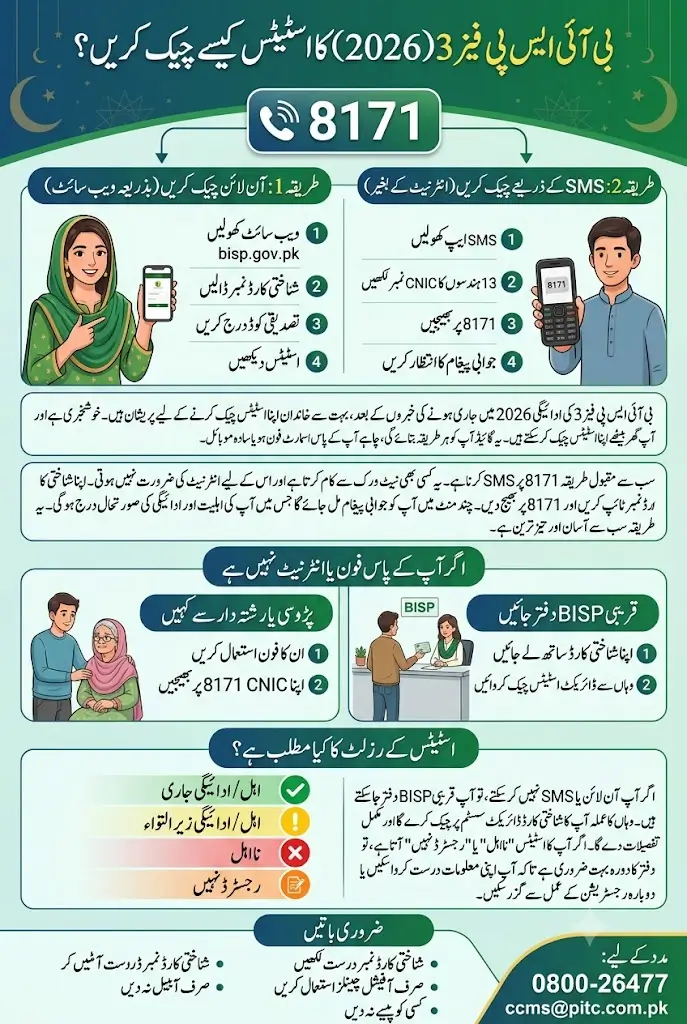
Send your 13-digit CNIC number to 8171 via SMS from any mobile network. You will receive a reply confirming your eligibility and payment status. If you have internet access, visit bisp.gov.pk and enter your CNIC to check online. No smartphone or internet required for the SMS method.
Also Read: How to Get Cross Subsidy Without QR Code Scanning – Alternative Method Guide 2026
Key Information
| Detail | Information |
|---|---|
| Programme | Benazir Income Support Programme (BISP) |
| Phase | Phase 3 — 2026 |
| SMS Number | 8171 |
| Online Portal | bisp.gov.pk |
| Required Information | 13-digit CNIC Number |
| SMS Cost | Standard SMS charges apply |
| Works Without Internet | Yes, via SMS method |
| Works Without Smartphone | Yes, any basic mobile phone |
| Offline Method | Visit nearest BISP Tehsil Office |
| Helpline | 0800-26477 (Toll Free) |
Method 1: Check Status Online Via BISP Website
This is the fastest method if you have a smartphone or computer with internet access.
Step 1: Open the Official Website
Open your browser and go to the official BISP website: bisp.gov.pk
Make sure you are on the official government website only. Do not use any third party websites or apps claiming to check BISP status. They are not official and your CNIC data could be misused.
Step 2: Find the Status Check Section
On the homepage, look for the “Beneficiary Status” or “Check Your Status” option. It is usually displayed clearly on the main page. Click on it.
Step 3: Enter Your CNIC Number
A box will appear asking for your CNIC number. Enter your 13-digit CNIC carefully. No dashes, no spaces. Just the plain number exactly as printed on your identity card.
Step 4: Complete the Verification
Enter the Captcha code or verification text shown on the screen. This is just to confirm you are a real person and not a bot.
Step 5: Check Your Result
Click the Submit or Check button. Your BISP Phase 3 status will appear on the screen within seconds. It will show whether you are eligible, your payment status, and any other relevant information linked to your CNIC.
Method 2: Check Status Via 8171 SMS Without Internet
This is the most popular method in Pakistan. And for good reason. It works on any mobile phone, does not require internet, and gives you a result within minutes.
Yaani, even if you have the most basic keypad phone, this method works perfectly.
Step 1: Open Your SMS App
Open the messaging or SMS application on your mobile phone. Any phone with SMS capability will work. Jazz, Zong, Ufone, Telenor, it does not matter which network you are using.
Step 2: Type Your CNIC Number
In the message box, type your 13-digit CNIC number. Nothing else. No name, no extra words, just the number.
For example: 3520212345678
Step 3: Send to 8171
Send this SMS to 8171.
That is it. Standard SMS charges will apply depending on your mobile network. It is usually a very small amount.
Step 4: Wait for the Reply
Within a few minutes, you will receive an automatic reply from 8171. This reply will tell you:
- Whether your CNIC is registered with BISP
- Your current Phase 3 eligibility status
- Whether your payment has been released or is pending
- Any additional instructions if action is required
Save this message. It is your official confirmation from BISP.
Also Read: BISP Resumes SIM Registration at All Offices Nationwide From Tomorrow Latest Update 2026
Method 3: If You Have No Mobile Phone and No Internet
This situation is more common than people think. Many elderly women, widows, and people in remote areas of Sindh, Balochistan, and Khyber Pakhtunkhwa do not have personal phones or internet access.
For these people, there are two solid options.
Option A Ask a Family Member or Neighbor
The simplest solution. Ask any family member, neighbor, or trusted person with a mobile phone to send your CNIC number to 8171 on your behalf. They do not need a smartphone or internet. Any basic phone will work.
Give them your CNIC number clearly, have them send it to 8171, and read the reply to you. The whole process takes less than five minutes.
Option B: Visit Your Nearest BISP Tehsil Office
If you cannot access a phone at all or want face to face confirmation, visit the nearest BISP Tehsil Office in your area.
Bring the following documents with you:
- Original CNIC or B-Form
- Any previous BISP payment documents if you have them
The BISP staff at the office will check your Phase 3 status directly on their system and give you full details on the spot. They will also help you understand the next steps if there is any issue with your registration or payment.
BISP Tehsil offices are present across all districts in Pakistan including smaller towns and rural areas. You do not need to travel to a big city.
What Your Status Result Means
When you check your status through any of the methods above, here is what the different results mean:
Eligible / Payment Released: Your Phase 3 payment has been approved and released. Visit your nearest BISP payment point or designated bank to collect your amount.
Eligible / Payment Pending: You are registered and eligible but the payment has not been processed yet. Check again after a few days.
Not Eligible: Your CNIC does not qualify under the current criteria. This could be due to income assessment, household survey results, or data mismatch. Visit your nearest BISP office for details.
Not Registered: Your CNIC is not found in the BISP database. If you believe you should be registered, visit your nearest BISP Tehsil Office with your CNIC to register or re-register.
Also Read: Government Releases Final Date to Repay Kisan Card Loan 2026: Consequences of Non-Payment Explained
How to Contact BISP If You Have a Problem
If your status is unclear, your payment is stuck, or you face any issue, here is how to reach BISP directly:
Toll Free Helpline: 0800-26477 This number is free to call from any network. No charges apply.
Official Website: bisp.gov.pk
Nearest BISP Office: Visit in person with your CNIC for direct assistance.
Asal mein, if you are facing a payment issue or your details are incorrect, the in-person visit to the Tehsil office is the fastest way to get it resolved. Staff there can update your information and escalate issues on the spot.
Important Things to Remember
Before you check your status or visit any office, keep these points in mind:
- Always use your original CNIC number exactly as printed on your card
- Only check through official channels — bisp.gov.pk or SMS to 8171
- Do not trust any third party websites, apps, or people claiming to check your status for a fee
- BISP never asks for money to register or verify your status
- If someone asks you to pay for BISP registration or status checking, it is a scam
- Keep your registered mobile number active because payment notifications and OTPs are sent to that number
FAQs
1. How do I check my BISP 8171 Phase 3 status in 2026?
Send your 13-digit CNIC number via SMS to 8171 from any mobile phone on any network. You will receive an automatic reply with your current Phase 3 status. Alternatively, visit bisp.gov.pk and enter your CNIC in the status check section.
2. Can I check BISP status without internet?
Yes. The SMS method to 8171 works on any basic mobile phone without internet. Just type your CNIC number and send it to 8171. You will get a reply within minutes.
3. What if I do not have a mobile phone to check BISP status?
Ask a trusted family member or neighbor to send your CNIC to 8171 on your behalf. You can also visit your nearest BISP Tehsil Office in person with your original CNIC for face to face assistance.
4. My BISP status shows not eligible. What should I do?
Visit your nearest BISP Tehsil Office with your original CNIC. The staff will explain the reason for ineligibility and guide you on whether you can apply for re-assessment or registration update.
5. How long does it take to get a reply from 8171?
Most people receive a reply within a few minutes of sending their CNIC to 8171. If no reply comes within 30 minutes, try sending the SMS again. Make sure your CNIC number is correct and complete with all 13 digits.
6. Is there a toll free number to contact BISP?
Yes. You can call 0800-26477 completely free of charge from any mobile network in Pakistan. BISP representatives are available to help with status queries, payment issues, and registration problems.
7. What documents do I need to visit a BISP office for Phase 3 status?
Bring your original CNIC and any previous BISP documents you have. The office staff will check your status and assist you directly. No appointment is needed for a basic status inquiry.
Conclusion
Checking your BISP Phase 3 status in 2026 is genuinely straightforward once you know the right method. The SMS option to 8171 is the easiest and works for almost everyone across Pakistan, even in areas with no internet. If you are still unsure after checking, do not wait or rely on unofficial sources. Walk into your nearest BISP Tehsil Office with your CNIC and get the answer directly from the people who actually manage the programme.